


Starting a program: training maxes and schedule
When you start a program, Durata runs a short one-time setup so it can put the right weight on the bar from your very first session. For a percentage-based program like 5/3/1 that means asking for your training maxes; if any of its sets carry a target RPE or RIR it may ask you to turn on Track Effort; and for any program it offers to schedule a start date. It takes under a minute, and this guide explains each step so none of it is a surprise.
If a program uses only simple linear progression, meaning it adds a bit each session, you'll go straight to the start date (plus the Track Effort prompt, if any of its sets give a target effort). The training-max step only appears for programs that are actually driven by training maxes.
Last reviewed 2026-11-21 · matches app v1.2
What the program page tells you first
Before any of the setup runs, a program's page covers what decides whether you start it at all: what your week looks like, how long the block runs, what it trains and how its progression works. Browse and program pages walks through the whole page.
The part that matters for starting is Where it takes you. It lists each main lift with the weight or training max it would open at, taken from your logged history with the same maths the setup sheets use, and charts where those lifts would go if every session goes to plan. The chart is worked out by the same progression code that will set your weights, so read it as the program's shape: it assumes every prescribed lift is met.
The minus and plus buttons beside each starting figure move the chart and save nothing. You set the real numbers when you start. A lift you have never logged has no starting figure rather than a guess borrowed from a similar lift, and a brand-new account with no history sees no chart.
Until you start it, a program from Browse is read-only: its sessions open with Close only.
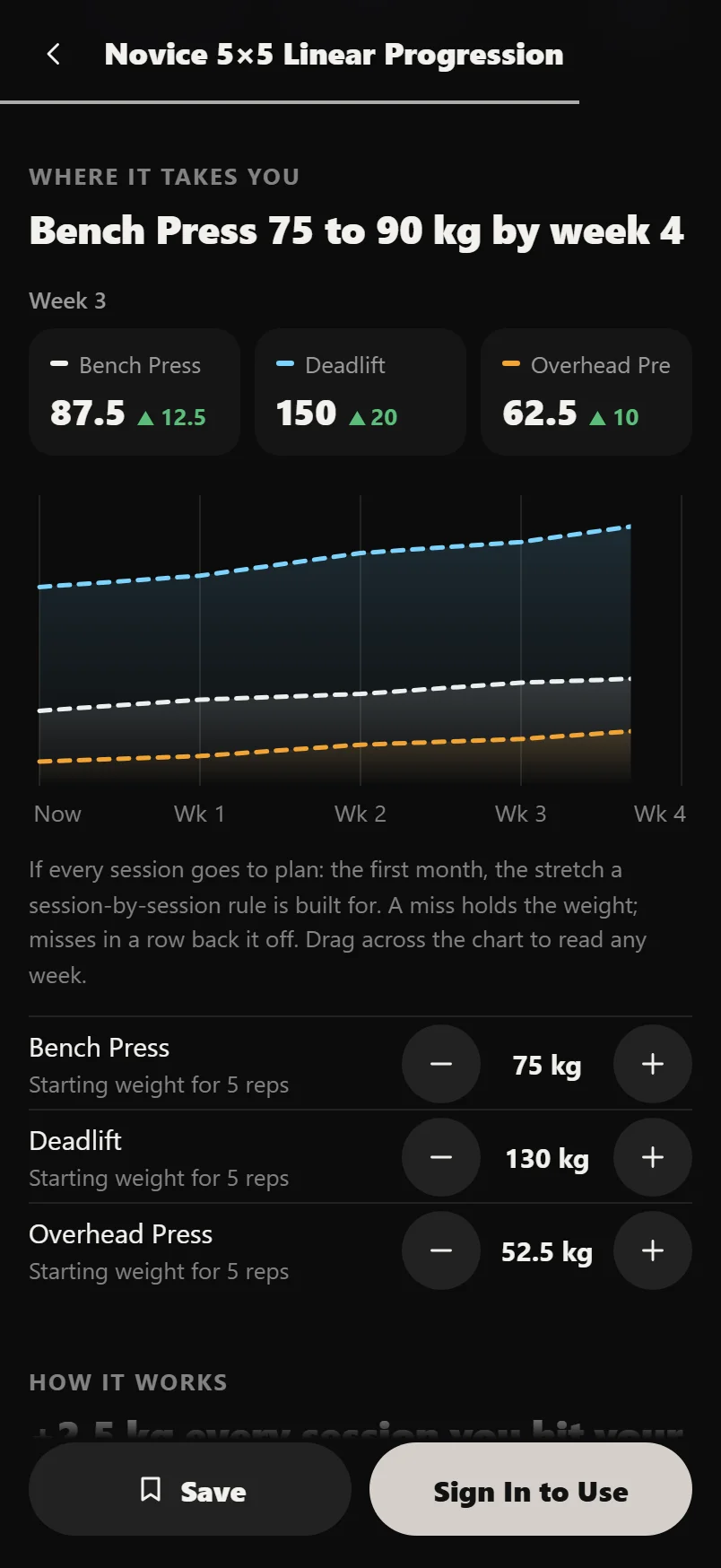
Drag across the chart to read any week's numbers for every lift on it.
Setting your training maxes
A training max (TM) is a working number your program's percentages are calculated from. It sits a little below your true one-rep max, so the prescribed weights stay makeable week after week. Percentage programs are built around it: a set written as '85%' means 85% of your training max, not 85% of an all-out max. A conservative TM keeps the weights heavy enough to progress and light enough that you don't miss reps and stall.
When you start a TM-based program, Durata shows a sheet with a row for each main lift and suggests a training max for you, estimated from your logged history, typically around 90% of your best estimated one-rep max (a few programs use 100%, and Durata knows which). If you've no history for a lift, you enter the number yourself. Don't overthink it: err low. A TM that's too light costs you a week or two; one that's too heavy stalls the whole program.
Each program you run from Browse keeps its own training maxes, so two programs that use the same lifts never mix their numbers. When you start one, the sheet fills each lift from your most recent program with the same kind of max, and says which program and date it came from. A max of a different kind, such as a 1RM where this program wants a 90% training max, is shown for reference rather than filled in. Your own plans and single sessions share one training max per lift.
Resume a paused program after another one moved the same lifts on, and Durata asks whether to use the newer maxes or keep the paused program's own: Use Newer Maxes or Keep This Plan's.
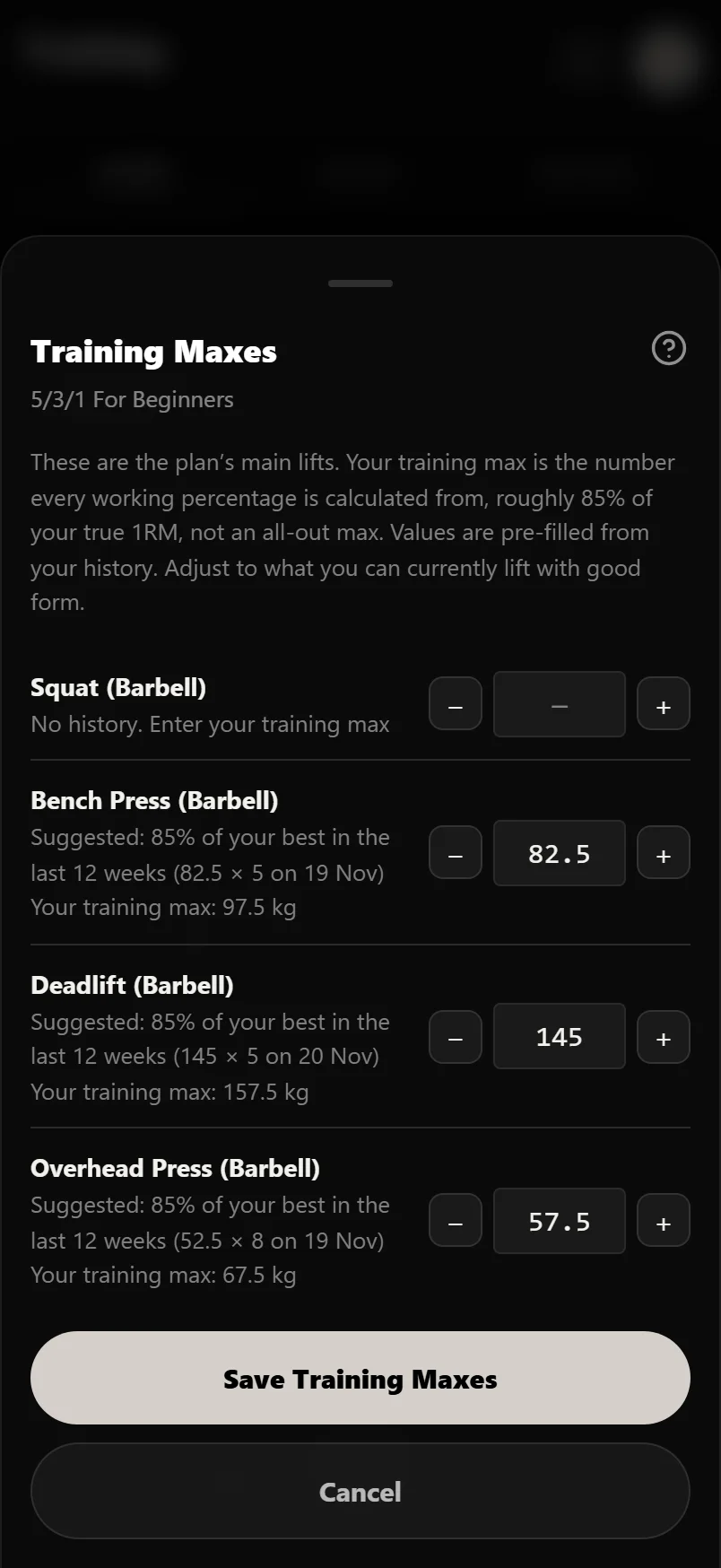
Your training max is not your one-rep max. If in doubt, set it to a weight you could do for a clean set of 5 today. The program should feel repeatable rather than maximal.
Turning on Track Effort
Before training maxes or the start date, Durata checks whether any of the plan's sets carry a target effort, an RPE or RIR, and whether your Track Effort setting already matches. If it does, nothing shows and starting continues straight through.
Some programs' progression actually reads your logged effort to move the weight: they reset or adjust a training max from the RPE or RIR you log on certain sets. For these, Track Effort isn't optional — a Turn On RPE to Start (or Switch to RPE to Start) sheet appears with no Not Now, and Cancel leaves the plan unstarted in your Locker until you turn it on.
Other programs just show a target RPE or RIR on their sets without using it to move anything. For these, a Turn On Track Effort? sheet offers to switch it on so you can see each set's target during your workout and log how it felt. Not Now skips it and starts the plan anyway; the targets won't show until you turn Track Effort on yourself in Settings. If you're already tracking the other measure, the sheet instead offers to switch, with Keep RPE or Keep RIR to stay as you are.
How your starting weight is set
Once you're training, each lift's rule travels with it. The progression line under the exercise name in your workout says what the rule decided for that lift: what earns the next increase, and after a change, which way the weight moved and by how much. You never have to remember what the program decided.
There's no sheet for this. A lift that isn't handled by a training max, such as an accessory on a training-max program, or every lift on a program with no training-max step, starts blank. Its first session shows the prescribed sets and reps, with last time's weight shown in grey if you've logged it before, and the first weight you actually log becomes that lift's working weight; progression climbs from there. Once the program is running, Working Weights in the planner's Plan Settings reopens the same list any time, pre-filled with a suggestion from your history for anything still unset, so you can set or adjust a working weight without waiting for a session.
Starting a touch conservative is the smart move here too, same as with a training max. Let your first logged weight be one you can complete with good form for every prescribed set, rather than your ceiling for the day, and let it climb over the weeks.
AMRAP sets and how your training max grows
Many percentage programs finish a main lift with an AMRAP set, short for 'as many reps as possible'. It's the last set at the day's top weight, and instead of a fixed number you do as many good reps as you can. This does two jobs: it's the hard, productive set that drives the adaptation, and it's the test the program uses to decide whether you've earned more weight.
In Durata, hitting the AMRAP target is what raises your training max for the next cycle. Beat the minimum reps and the app bumps that lift's TM by a small automatic increase, so next cycle's percentages are calculated off a slightly heavier number. Miss it, and the TM holds so you can consolidate. That is how a TM program progresses: the AMRAP set earns the increase, and the training max carries it forward. You never work out the next jump yourself.
Leave a rep or two in reserve on AMRAP sets rather than grinding to absolute failure. You'll still trigger the progression and recover better for the next session. See our RPE and RIR guide.
Scheduling a start date
Finally, Durata offers to schedule when the program begins, and it recommends next Monday by default. Program weeks run Monday to Sunday, so starting on a Monday lines your training week up cleanly with the program's, which is why it's the suggested option, one tap away. You can take that recommendation, start today instead, or pick any date on the calendar. Whatever you choose is marked on your History calendar, and the sheet shows you exactly which session you'll begin with.
The sheet also has Train on Set Days, on by default. Leave it on and each session sits on its weekday. Turn it off and the plan runs in order instead, each session after the last one you logged, whatever day it is, which suits weeks that don't go to plan. The switch only shows on a fresh start of a plan whose rules don't depend on weekdays (Fierce 5 and Ivysaur 4-4-8 do), and you can change it later in the planner's Plan Settings.
Not every plan runs on that Monday-to-Sunday model. A plan with no fixed weekdays runs as a rotation instead: its sessions go in order, one after another, regardless of the day of the week, so there's no week for a start date to line up with. Scheduling a rotation skips the Monday recommendation and defaults to today, and the sheet still names the session you'll open with, just without a day of the week attached to it.
Pick a date in the future and the program waits for it. The date is pinned on your History calendar and nothing else moves: no sessions appear on Home or the Workout tab, and no session reminders fire. Your first session appears on the morning of your start date, not before.
For a Monday-to-Sunday plan, a date partway through a week splits it rather than skipping it. Start on a Saturday and Saturday and Sunday fill in while Monday to Friday stay empty, which is why the sheet names the session you'll open with and counts the ones you're passing on by joining the week late. A rotation has no week to join partway through, so this doesn't apply to one.
The start date isn't set in stone either. Start Date in the planner's Plan Settings opens the same sheet, so you can move it later. Your training maxes and logged history are kept.
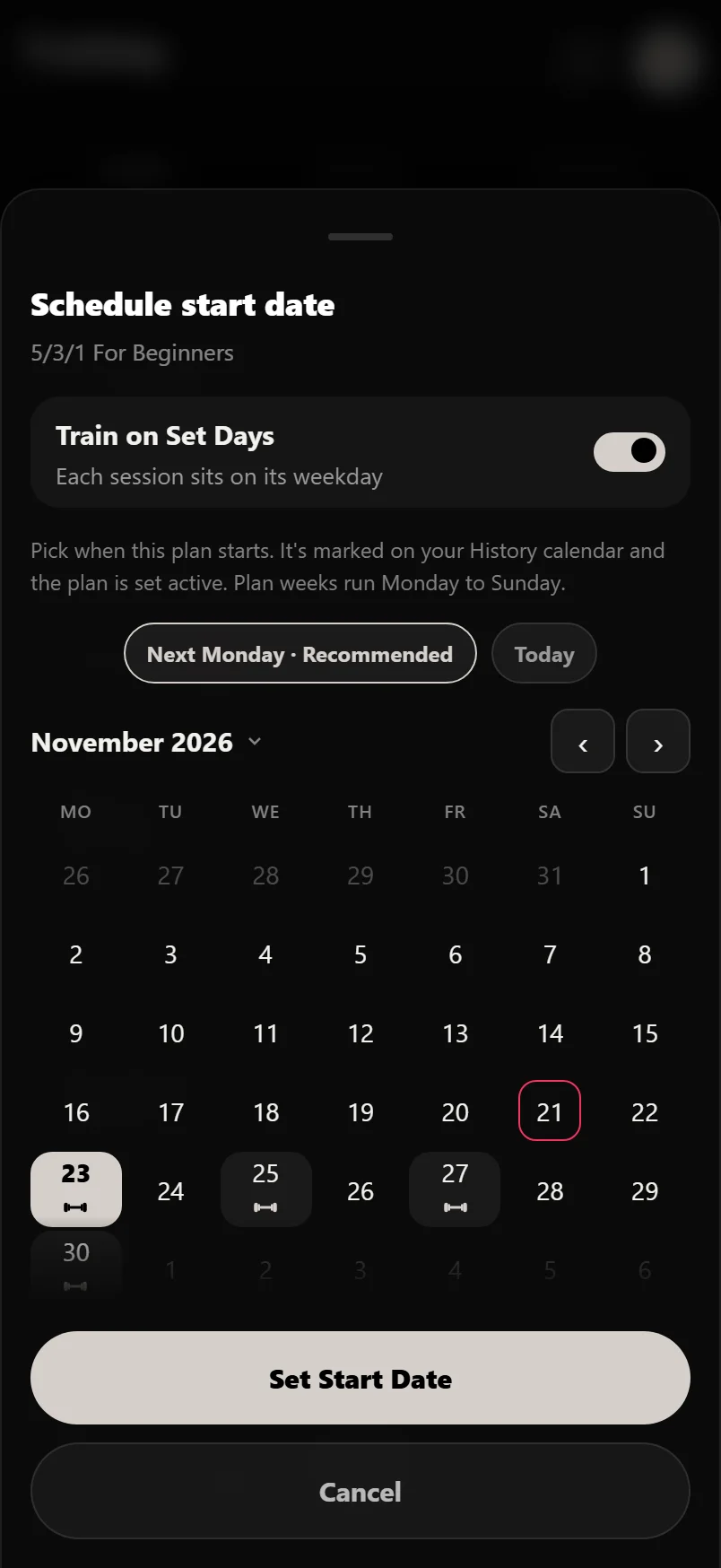
Scheduling a program doesn't stop you training in the meantime. A session you start before the date is logged normally; it just doesn't count towards the program's first week.
Setting a start date can be followed by one more offer: Fuel this plan?, a one-tap way to set nutrition targets for the block ahead. It only shows up when Durata has something to build it from, and only once per run. Skip it and nothing is created.
Common questions
Can I see what weights a program would give me before I start it?
Yes. Open the program's page and scroll to Where it takes you. It lists each main lift with the training max or working weight it would open at, estimated from your logged history with the same maths the setup sheets use, and charts where those lifts would go if every session goes to plan. Nothing is saved, and you can change every number when you actually start. It needs some logged history to work from, so a brand-new account sees no figures.
Does each program keep its own training maxes?
Yes, for programs from Browse. Each run keeps its own, and a new start is filled from your most recent program with the same kind of max, which the sheet names. Your own plans and single sessions share one training max per lift.
Can I run a program in order instead of on set weekdays?
Yes, for most programs. Turn off Train on Set Days on the start sheet, or later in the planner's Plan Settings, and the sessions run one after another from the last one you logged.
What is a training max?
A working number your program's percentages are calculated from, set a little below your true one-rep max so the prescribed weights stay makeable every week. A set written as '85%' means 85% of your training max. Keeping it slightly conservative is what stops you stalling.
How does Durata set my training max?
When you start a training-max program it suggests one per lift, estimated from your logged history, usually around 90% of your best estimated one-rep max (some programs use 100%, and Durata knows which). If you have no history for a lift, you enter it yourself. When in doubt, set it low.
What does AMRAP mean?
'As many reps as possible'. It is the last set at the day's top weight, where you do as many good reps as you can instead of a fixed number. In a training-max program, beating the AMRAP target is what earns an automatic increase to that lift's training max for the next cycle.
Do I have to set my weights when I start a program?
No sheet asks for them. Training-max programs ask for your training maxes up front; every other lift, accessories included, starts blank and takes its first working weight from the first session you log, with last time's weight shown in grey as a reminder if you've trained it before. You can set or adjust any lift's weight afterwards from Working Weights in the plan's Plan Settings.
Will starting a program ever ask about Track Effort?
Yes, in two different ways. If the plan's progression reads your logged RPE or RIR to move a training max, Track Effort is required to start it: a Turn On RPE (or RIR) to Start sheet appears with no Not Now, and Cancel leaves the plan unstarted. If the plan only shows a target RPE or RIR without using it to move anything, the prompt is optional — Not Now starts the plan anyway, and you can turn Track Effort on later in Settings.
Can I change my program's start date?
Yes. Open the plan's planner and tap Start Date in Plan Settings. It opens the same sheet you used when you started, so you can pick a new date. Your training maxes and logged history are kept.
I scheduled my program for next week. Why would it show sessions this week?
It won't. A program scheduled for a future date waits for it: nothing lands on Home, the Workout tab or your reminders until that day arrives. If you want to begin sooner, tap Start Date in the planner's Plan Settings and pick an earlier date, or Today.
Can I run a program again after I finish it?
Yes, and you don't have to go looking for it. A finished program keeps its place in your Locker, reading Completed with the date you finished. Tap it to open its program page, where the button at the foot is Start Again. That spins up a fresh run from week one and carries your finished run's weights straight into it, so you don't start cold — there's no sheet to adjust them from first, just a new start date to pick. Once the new run is going, Working Weights in Plan Settings lets you change any of them. If you changed the plan itself (swapped a lift, edited a session, added or removed sessions or weeks, changed a progression rule), the new run keeps your version. A catalogue plan you left as it came is rebuilt from the current catalogue copy, so any fixes shipped since your first run come with it; setting your training days, renaming a session or moving one to another day does not count as changing it. Run the same program several times and it is still one row in your Locker, showing the newest run, while every run keeps its own report under Progress, History.
What if my program doesn't run Monday to Sunday?
Some plans have no fixed weekdays and run in order instead: sessions go one after another from whichever date you start on, not tied to the calendar week. Scheduling one skips the Monday recommendation, since there's no week to line up with, and defaults to today instead. Everything else about starting it (training maxes, accessory weights, AMRAP) works the same way.
Does starting a program ask about nutrition too?
It can. Right after you set a start date, Durata may offer to fuel that block: a one-tap Fuel this plan? sheet that sets up nutrition targets for the program's dates. It only appears when there's something for it to build from, and only once per run. Say no, or don't answer, and nothing is created.
Put it into practice
Durata is free to use — 84 proven programs, automatic progression, rest timers and PR tracking, all on your phone.